
 This is an update to my first post about connecting a stepper motor to an Arduino or other microcontroller.
Wiring it up
This is a basic transistor circuit set up as a switch. It can also be called an open collector configuration since when it’s on it essentially connects what is on the output to ground. This type of circuit is useful for things like motors or lights where you are simply turning something on or off and need to provide more current than the microcontroller can. When it’s “on” it connects the output to ground and can pass a relatively large current through the transistor. When it’s “off”, the pullup resistor pulls the output high. When pulled high, it cannot provide much current, but since the controlled device is off, it doesn’t need to.
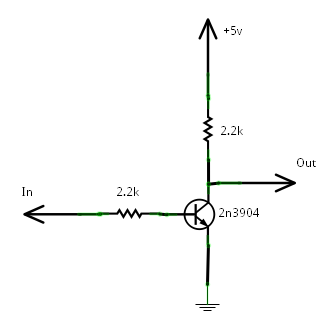
One thing to note on this type of circuit is that it is also an inverter. This means that when you input a high, you get a low output and when you input a low, you get a high output. This will come in handy later.
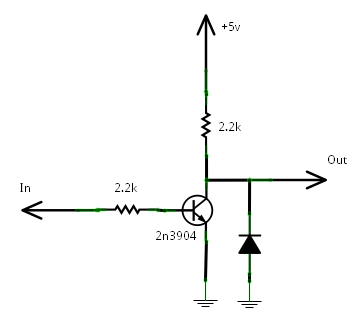
Since we are going to be driving an inductive load, it is a good idea to use a snubber diode (shown below) to arrest any voltage spikes that occur when you turn off the inductor (coil).
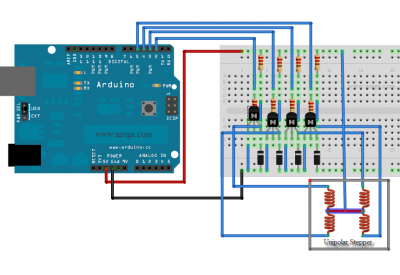
Here is an example of how this transistor switch circuit can be used to control a stepper motor. In this example I’m using four transistors for the four coil taps on the motor. This is a unipolar stepper motor so it has an extra tap that is connected to +5 volts (or whatever voltage you are using for the motor). This makes a unipolar motor easier to use since all you need to do is ground each of the four coils. With a bipolar stepper motor, you need a more advanced circuit called an H-Bridge that can swap the voltages on each end of each coil. (That’s something I may cover in a later post)
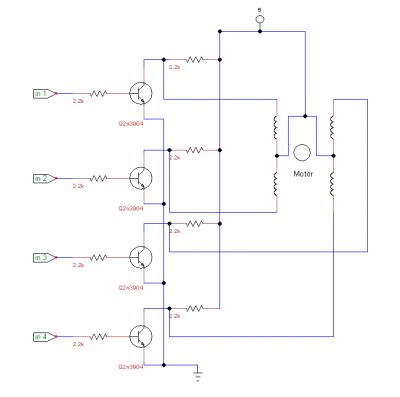
As you can see above this design requires four input lines from the Arduino.
Here is another illustration of it:
 Making it go

Now that the stepper motor is all hooked up, we need to talk about how to make it move. This is the basic sequence that makes the motor move.

Moving from one step in the sequence to the next makes the motor move one step. If you go forward in the sequence, the motor moves forward one step and if you go back, the motor moves back one step. Stepper motors also have a specific number of steps needed to move one full revolution. For example the motor I’m using has 200 steps in a revolution.

The Arduino software comes with a library that makes it easy to control a stepper motor. Here is some example code to get it going: random_stepper2.pde. One problem with this basic setup is that it requires four wires to control it. An Arduino only has twelve digital pins readily available, so if you have big plans for your Arduino project, you will run out of ports very quickly. Wouldn’t it be nice to only use two wires?
The Two Wire Method
I mentioned earlier that the NPN transistor switch is also an inverter, meaning it outputs the inverse of the output. If you give it a 1, you get a 0 and if you give it a 0, you get a 1.
Now if you look at the stepper sequence you might notice something interesting. Of pins 1a and 1b, they are never the same. They are always the opposite of the other one.

The same is true of the other pair:

So, if we use the output of one transistor switch as the input of another one, we can eliminate one unnecessary input on each side.
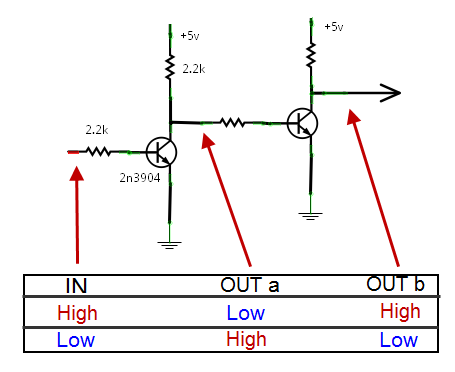
So now, our circuit looks more like this:
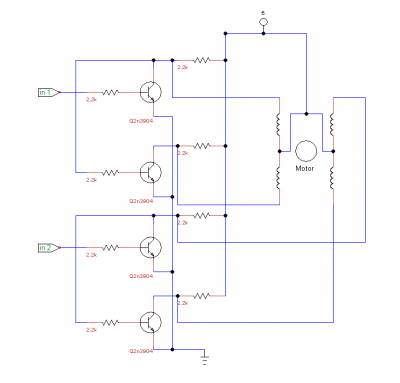

In the Arduino software sketch, the line to set up the stepper motor looked like this:
Stepper stepper(STEPS, 2, 3, 4, 5);
But with out new two wire system it needs to be changed to this:
Stepper stepper(STEPS, 2, 3);
And that’s all that needs to change as far as the code goes. It functions just the same.
Now go find a stepper motor and start experimenting. I found this motor in an old floppy drive. Old computers are a great place to find parts like motors, fans, lights, and lots of other things.
Let me know below if you found this guide helpful or to share your experience with stepper motors.
I am having a problem with my interpretation of what you have done. When I have no load on any of the output lines to the stepper motor and check each one individualy, they work perfectly. But when I have a stepper attached (or even LEDs for test purposes, they all stay High. I would love to send the schematic of but do not see that option on this web site.
Thank you for posting this. I used this circuit and it works great. I built a second and hooked it up to two of the remaining pins on the arduino and the two motors seemed to interfere with each other and neither worked properly. Any ideas of what is needed to run multiple steppers using a few of these circuits?
Matt, you can try moving the snubber diodes to +5 instead of ground (anode to motor input and cathode to +5) so they are in parallel with the coils. This is probably how they should have been hooked up anyway to better suppress the voltage spikes caused when each coil is turned off.
The voltage spikes are probably what’s causing interference between the two motors.
Here is more information on snubber (flyback) diodes:
http://en.wikipedia.org/wiki/Flyback_diode
Hello. Thank you for posting this!
I tried methods written here and with quite some struggling I got 4 wire variant working. (2 wire variant was kind of unstable, probably my fault). I have installed flyback diodes between coils and + input. Setup works, but unfortunately motor is rather weak. (I guess that’s the reason why special stepper driver kits are sold on web?)
My materials: I have motor ripped out from old printer. 8 resistors(2,2k), 3 transistors(N3904), 4 diodes (4002) but now it rotates very slowly and cannot move even gears (without any mechanic obstacle). Is it normal? I didn’t knew voltage of my motor, so i tried 12V and in hope for more power i connected 24V, but 24 V is same with exception that motor gets hot. Do you have more good tipps?
Xheight. I haven’t tried using a voltage other than 5v, but that’s something I’m going to work on. I would guess that since you’re using a higher voltage for your motor and driver circuit than your arduino, that the transistors aren’t turning fully off or on. Try measuring the output voltage of the transistors. Each one should be 0v or vcc (12v or 24v), nothing in between.
I would also try 5v and see what result that gives you.
If the transistors aren’t turning off or on completely, that could also be the reason the 2 wire configuration isn’t working.
One more thing: i didn’t describe 100% my software setup. 5V and “random stepper”.pde example file with modified line, rotated a bit, but not very well. With Arduino +5 din’t move at all. Just twitched. A bit of googling i decided to change my protype and separated the “child transistors” (2 wire method) that were linked with 2 parent transitors. This made my board into 4 wire thing. After that i used stepper program that sends Ground signal properly to each pin. Now at intermediary speeds it rotated (10-50). Then i modified the example code and added half steps. It got slower, but a bit stronger at least. Vibrates as well less. Smooth, but weak. When it moves slower it is a bit stronger.
I will look whats up with transistors, maybe indeed they dont fully go to 0. Thank you!
have anyone got a decent speed out of the motor using the schematic. the series resistor(2.2k) connected to output reduces current.if you use smaller resistance (50 ohm) for supply from 5-9v.the speed increases.but the heat loss from the series resistor is so high that i actually burnt my finger.
also even when i apply input current through the base the motor continues to run. the transistor is running saturated . i cant figure out why the current is flowing through the motor when the collector voltage is 0 when running saturate.
Bid, the 2.2k resistor should not be in series with the motor. It is simply a pull up resister so that the transistor will turn off. If it is getting hot, you have connected it wrong. Try checking your schematics. When each transistor turns on, the current goes from +5, through the motor coil, through the transistor, then to ground.
How did you choose the 2.2K resistors? I’m hoping to use a 42BYG401 (6V, 0.8A, 7.5Ohm, 2.2Mh). I’m also planning on using a Tip120 (darlington array) instead of your 2n3904 as I need more power. I’m just curious if I’ll need to change the resistors based on my modifications.
I’m kinda of a noob at all this. I’m trying to figure out what the resistors are for? I thought a pull up-resistor was to keep a pin from floating, so the resistor after the transistor is pulling it back up towards the 5 volt so that it isn’t floating? What is the resistor after the digital pin doing? Any help would be appreciated thanks!
Hi, for all of you out there having issues with this, I used an ULN2803 instead of the transistors and it worked fine.
The darlington array on the IC makes it easy and risk free to try this type of connections.
Hi,
I want to use this for a battery driven unit. it seems that one coil will always be drawing power.
would it be possible to add a cap and a PNP to the input to the motor ? this would have the effect of cutting power when there are no signals.
Since I have feedback of location, I can loose steps without concern.
Also, I have created a schematic that I hope is correct. is there any way to submit it for review ?
Great tutorial!
Could you, please, do stepper motor circuits with buttons (forward and backward) and also circuit with sensors, for example, rain sensor and presence sensor? Thank you